
Example Policy
- ID: user-account-access
- Data access reason: to login to your website, greet the customer by name and show a friendly avatar image
- Retention: 2 years after last read or write
Metronome has 5 top level concepts, each of which is described in more detail below. We recommend that you read them in order.
Consider the following simple system with 1 database that contains PII and 3 business systems that access that PII.
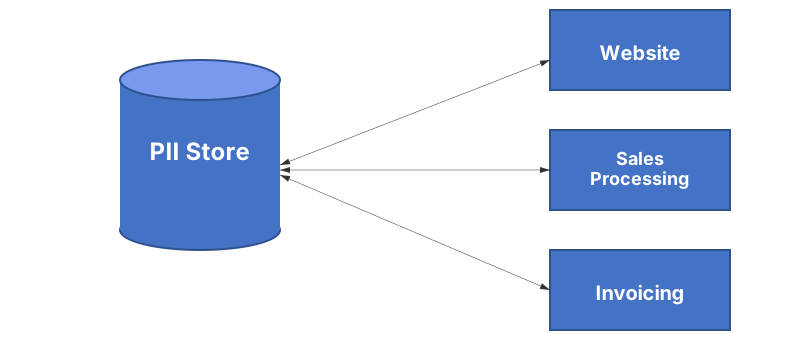
API keys give access to specific functions on your Metronome instance. Each software component that handles PII should have its own API key and that key should only have permissions suitable for its function. In the example diagram, there are 3 software components accessing a centralised PII database. Each component (Website, Sales Processing and Invoicing) should have an API key which represents and names the component that accesses Metronome with permission to post telemetry. When these components post telemetry to Metronome, a log entry for each item is written specifying the component that access it, the date and time of the access as well as the policies that describe why the data was used. You must never share API keys between components that do not perform the same activities.
API keys have a description (a string that you specify), a status (enabled or disabled) and permissions. Once an API key is created and described, you should keep that key only for that system so that access logs properly record which system accessed PII. If the composition of your software changes, you should create new keys that reflect the new components then stop using the old keys and disable them. This way, the item logs will show the change of use from old components to the new ones. We infer no meaning from the name or description. They are used for reports that you consume when you query any usage log.
Central to our solution are data use policies that you define and control in cooperation with your Data Protection Officer (DPO). The policies have a string identifier that you give to your software developers to use when publishing telemetry for PII use. These policies specify the reason for the data access as well as how long the data should be retained for that reason in your business. For example, you might specify a policy named user-account-access to be used when a user logs in or updates their data and causes any data used to be retained for an additinal 2 years from the date of access.
Example Policy
A policy ID is a string of text that you define. Policy IDs are immutable and once defined can never be changed or deleted. If the purpose for handling data changes, instead of renaming or deleting a policy, you should create a new policy whose ID will reflect the change of purpose in the item access logs.
Items represent a group of PII that have some dependency, are probably used together and should share some aging characteristics. Items have sub-items that represent distinct PII fields. If you use an SQL database, you might consider a row of data to be an item and the column names to be the sub-items.
Example Customers Table
| id | name | last_login | |
|---|---|---|---|
| 123 | John Doe | j.doe@some-domain.com | 2023-06-04 |
Metronome is a zero trust solution so you must only send identifiers and not PII. In an SQL database with a customers table that uses an auto-increment field named id that is the primary key, you might have a row with id value 123. Since 123 is not personally identifiable, it is safe to use this value as part of an identifier that you send to Metronome. You could represent this row in Metronome with an item-id like customer-123. If that table has columns like name and email you can send telemetry with those column names as sub-items. Billing counts items only - we do not count sub-items.
Example Customer JSON Object
{ "type": "customer", "name": "John Doe", "email": "j.doe@some-domain.com", "last_login": "2023-06-04"}If you use a NoSQL database like MongoDB, an object that contains PII would be an item and the field names inside the object that contain specific PII like an email address, would be sub-items. In this case you could use the MongoDB objectID for the object if you do not have a natural key for it.
Each time an item is handled, you must sent telemetry to Metronome specifying why the data is handled. Telemetry consists of a date and time, the policies specifying why the data was handled and a list of items and sub-items that were handled. By sending this telemetry we age the identifiers (update when they expire) as well as writing to the item and sub-item logs. The API key used to submit the telemetry identifies which system handled the data. You can query each item and sub-item’s access log to help automate data subject requests. The log can be queried for a specific time range or in its entirity with results provided in JSON format or data structures in your chosen programming language.
[ { "timestamp": "2023-04-06T13:19:22Z", "access-type": "telemetry", "access-authoriser": "public-website", "access-policies": ["user-account-access"], "effective-expiry-policy": "user-account-access", "effective-expiry-date": "20250406", "accessed-sub-items": ["email", "name"] }, { ... }]Each time that a policy is updated, a policy change log is also created, specifying the system which modified the policy, as well as a delta which describes the policy before and after the modification.
When you access PII data in your data store and send telemetry to Metronome, we update the date on which an item or sub-item would expire according to the policies you specify. Each day you must run at least one process to check which items expired the previous day, then remove the expired PII from your data store. If you keep PII in multiple data stores, you should probably run a process per PII store to fetch expiry notices and delete expired items in each store. Items will never expire before any sub-item, but will expire with its last sub-item.
{ "expiry-date": "20230512", "pending": [ { "expiry-type": "SubItemsExpiry", "parent-item-id": "customer-123", "sub-items": ["email", "name"] }, { "expiry-type": "ItemExpiry", "item-id": "customer-123" } ], "complete": []}You can query future dates and you will see items listed there as pending. Pending notices are subject to change and must not be acted on. Dates in the past should list items and sub-items as complete, depending on your daily process observing items and sub-items to be expired, deleting them then posting to the Metronome expiry notice end point for that day. Completed items will not change (since you have deleted the data). Sub-item expiry notices are separate from item expiry notices. The expiry type field denotes which entity (item or sub-items) the notice is for.